Valheim Crafting & Repair Guide
Scope: Vanilla standard survival; world modifiers, mods and later patches can change the rules
Language: English中文
Key points
- A recipe that will not appear is not always a material shortage — crafting involves material discovery, station type and station level.
- Ore to gear takes more than one machine: raw material, fuel, smelting, forging, then upgrades.
- After building an upgrade attachment, check the station level actually changed; distance, space and the wrong attachment all look identical.
- Fixed order: station → recipe tab → where the materials actually are → level and placement.

On this page
A recipe that will not appear is not always a material shortage. Crafting in Valheim involves material discovery, station type and station level. Break "what I want to make" into three questions: which station makes it, has my character touched the materials it needs, and does that station meet its conditions? Answer those before you go out for more resources.
You just unlocked a material but see no gear
After picking up something new, watch for the unlock prompt, then open the matching crafting menu. Some materials feed an intermediate product first, and that product unlocks the gear. Getting ore does not mean the Forge instantly lists every metal item. The full set of crafting types is on the Crafting page.
In a group, a material a teammate picked up is not a material you have checked against your own recipes. Lay new materials out at base so whoever does the crafting can actually touch them and read the prompts, instead of guessing back and forth in chat.
Ore to gear takes more than one machine
The basic chain is raw material, fuel, smelting, forging, then later upgrades. A Smelter needs stone and Surtling cores to build, and a Forge needs copper among other materials — see Smelter and Forge. Fill in whichever step you are missing; you do not need to stockpile an entire age of ore first.
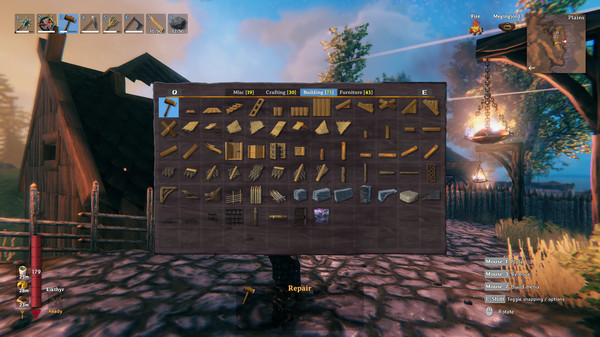
Keep inputs and outputs in separate storage in the production area. Raw ore and finished bars in the same junk chest is what creates the "I clearly have the material and still cannot make it" feeling. Check fuel and actual output once more before you leave the area.
When the station level is too low
Upgrades usually depend on the matching attachment being placed where it counts. After you build one, check whether the station level actually changed; if it did not, look at distance, space and whether it is the right type of attachment. Not everything that looks like furniture is an upgrade piece.
Also keep crafting a new item and upgrading an existing one apart. The wrong tab or the wrong target item makes the interface behave as if you are short on materials. Confirming by name and quality one item at a time beats hauling every raw material onto your character.
Make repairing a habit
Check repairs at the right station as soon as you get home, rather than working out the rules when a weapon breaks in a crypt. Repairing and re-crafting are different things, and repairing does not necessarily cost another set of recipe materials; whether an item can be repaired at all depends on its station and conditions.
Before an expedition, look over your main weapon, shield, tools and spares one by one. Repairing the axe and forgetting the pickaxe is easy to do on a mining run. If an outpost cannot repair what you are carrying, treat it as a waypoint rather than a full base.
One general troubleshooting order
Check the station, then the recipe tab, then whether the materials are actually in an inventory you can use, then level and placement conditions. If it is still wrong, note the item name, the interface prompt and your mod situation, and handle it as a fault. Do not delete a save without a backup to solve what may just be a placement distance.
Crafting problems at a glance
| Prompt or symptom | Check first | Do not jump to |
|---|---|---|
| Recipe missing entirely | Material discovery, station type, tab | Tearing down and rebuilding every station |
| Visible but not craftable | Where the materials are, quantity, station level | Staring only at your total raw stock |
| Upgrade built, nothing changed | Matching station, distance, placement | Building another set for no reason |
| Item cannot be repaired | Repair station and level required | Dropping it and crafting a new one |
Work through the in-game prompts first; if you run mods, compare against a vanilla test.
Recipe · Workbench
| Material | Qty |
|---|---|
| Wood | 10 |
Recipe · Forge
| Material | Qty |
|---|---|
| Stone | 4 |
| Coal | 4 |
| Wood | 10 |
| Copper | 6 |
Recipe · Smelter
| Material | Qty |
|---|---|
| Stone | 20 |
| Surtling Core | 5 |
Recipe · Charcoal Kiln
| Material | Qty |
|---|---|
| Stone | 20 |
| Surtling core | 5 |
Sources
The mechanics and numbers in this guide come from the material below. Open the original pages to check them yourself.
- S001 Crafting valheim.fandom.com Accessed
- S002 Smelter valheim.fandom.com Accessed
- S003 Forge valheim.fandom.com Accessed
- S004 valheim.wiki valheim.wiki Accessed
- S005 valheim.wiki valheim.wiki Accessed
- S006 valheim.wiki valheim.wiki Accessed
- S007 valheim.wiki valheim.wiki Accessed
Related guides
Valheim Bronze Age: Copper, Tin, Gear
From entering the Black Forest to a working Valheim bronze line: a sensible order for mining, Surtling cores, fuel, tools and your first metal gear.
v1.0.12Valheim Mods Broken After Update: What to Do
Handle launch failures, missing items and multiplayer mismatches with backups, a vanilla test and staged restores, with no unverified compatibility claims.
v1.0.12Valheim Base Building: Your First Base
How to build your first practical Valheim base: picking a site, roofing, venting smoke, structural stability, production layout and emergency supplies.
v1.0.12