How to Play 911 Dispatch: Answer, Locate, Send Units
Scope: Official game description and promotional images read 5-6 November 2026 (UTC), plus dated creator video descriptions
Key points
- The developer lists four steps: answer, ask where and what, enter the incident and send units, then watch them on the map.
- Units radio you if they need backup.
- When a caller barely knows where they are, you ping their phone on the map.
- A short training shift teaches the basics before your first real shift.
On this page
In 911 Dispatch you sit at a dispatch computer and handle emergency calls one at a time. The phone rings, you answer, ask the caller where they are and what happened, enter the incident and send police, fire trucks or ambulances. Then you watch the units drive there on a map of downtown Chicago and answer their radio calls.
What are the four steps of every call?
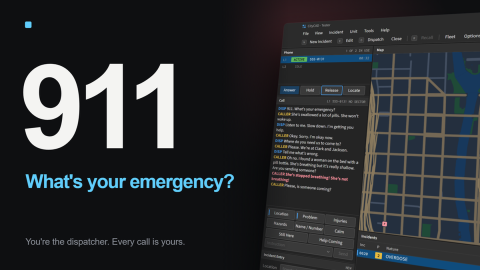
The official description numbers them. The table copies each step and adds what the official promotional console image shows for it.
| Step | Developer's wording | What the official console image shows |
|---|---|---|
| 1 | "Phone rings, you answer it" | A Phone panel with numbered lines and an Answer button |
| 2 | "Ask the caller where they are and what happened" | Question buttons labelled Location, Problem, Injuries, Hazards and Name / Number |
| 3 | "Put the incident in and send units" | New Incident, Edit and Dispatch on the toolbar; an Incident Entry box |
| 4 | "Watch them drive there on the map. If they need backup they radio you" | A Map panel of Chicago streets and an Incidents list with a nature such as OVERDOSE |
The same image shows Hold, Release and Locate next to Answer, and Calm, Still Here and Help Coming among the caller buttons. The game records do not explain each button, so this guide describes them only by their labels.
What if the caller panics, hangs up or is lost?
The developer warns that "not every caller is helpful. Some panic, some hang up and some barely know where they are, so you ping their phone on the map." In other words, you cannot always get an address by asking. The Locate button in the official image sits beside the phone controls, and the image transcript shows a caller describing a nearby intersection instead of an address.
| Caller problem | Official description | What to reach for |
|---|---|---|
| Panicking caller | "Some panic" | The Calm option shown in the console image |
| Caller hangs up | "some hang up" | The records do not say whether a line can be called back |
| Caller does not know the address | "barely know where they are" | Ping their phone on the map |
According to a YouTube description by Articfox…gamingyt (20 October 2026), the job is "answering the calls and asking questions to get the right people out there for the job." MACKY's video description (26 October 2026) says being a dispatcher in the game "is harder than I expected."
Which units can you send?
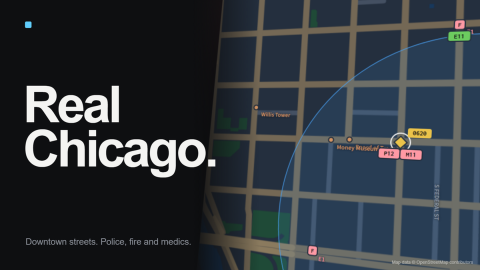
The description names police, fire trucks and ambulances. The second official image, titled "Real Chicago," shows map markers labelled P12, M11, E11 and F, under the caption "Police, fire and medics." The records do not define each label, so the Fleet guide only uses unit names that appear in official text, such as the patrol car and medic in the Starter Pack.
How do you learn the controls?
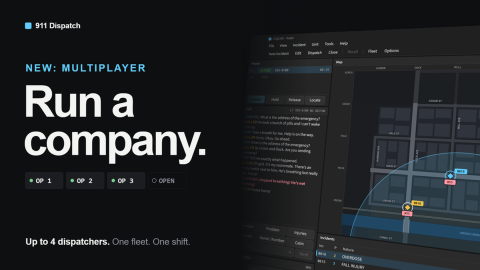
"A short training shift teaches the basics," according to the description. After training, each shift ends with a grade and pay, and shifts can run "from 2 minutes up to an hour." See shifts and pay for how that pay and XP are boosted. If you want help on the console, the multiplayer guide explains how up to four dispatchers share one company.
Can other players interfere with your calls?
Not in solo play. The description says "everyone gets their own city so nobody messes with your calls," and "progress saves." Shared play only happens inside a company you found or join.
Sources
- S001 · Official Roblox game record · S · Accessed 6 November 2026. Supports: the four steps, caller behaviour, training shift, own-city rule.
- S002 · Official promotional images · S · Accessed 6 November 2026. Supports: console button labels, map unit tags, captions.
- S003 · Articfox…gamingyt on YouTube · B · Accessed 5 November 2026. Supports: the creator's description of the job only.
- S004 · MACKY on YouTube · B · Accessed 5 November 2026. Supports: the creator's "harder than I expected" description only.
Sources
The mechanics and numbers in this guide come from the material below. Open the original pages to check them yourself.
- S001 Official Roblox game record games.roblox.com Accessed
- S002 Official promotional images thumbnails.roblox.com Accessed
- S003 Articfox…gamingyt on YouTube www.youtube.com Accessed
- S004 MACKY on YouTube www.youtube.com Accessed
Related guides
911 Dispatch Shifts and Pay: Grades, XP and Overtime
How 911 Dispatch shifts pay out: end-of-shift grades, pay and XP, Overtime rules, Double Pay and Double XP, the Plus bonus and what mutual aid takes from pay.
911 Dispatch Fleet Guide: Units, Districts and Mutual Aid
911 Dispatch Fleet guide: what cash buys (units, districts, upgrades), the 14 Chicago districts to unlock, police, fire and medic units, and mutual aid costs.
911 Dispatch Multiplayer: Companies, Codes and Shared Pay
How 911 Dispatch multiplayer works: found or join a company by code or open list, share one console with up to 3 others, and how fleet, funds and pay split.