Roblox Stock Exchange 2 Updates: Official Event History
Scope: All 12 events returned by the Roblox virtual-events listing for the game on 2026-10-08 (the listing returned only the last 2 events on one request that day and all 12 on later requests), official event art, and creation dates of passes, products and badges; an event listing is an announcement and does not prove when a feature went live; we found no official patch notes
Key points
- The Custom Offices event is listed to start on Saturday 10 October 2026 at 20:00 UTC, and its listing ends on 16 October 2026 at 23:00 UTC.
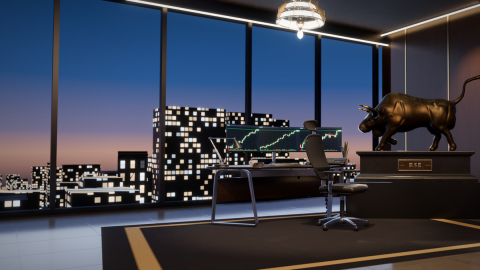
- The listing describes it in one line: "Your own 3d office you can walk inside of and upgrade".
- The developer has listed 12 events with start dates from 17 August to 10 October 2026, and every Saturday from 22 August to 10 October has a listed start.
- The "updated" time on the game's Roblox record changed on each of three reads within 24 minutes, so we do not use it as a patch date.
Roblox Stock Exchange 2 has 12 official update events on Roblox. The first was listed to start on 17 August 2026. The twelfth, Custom Offices, is listed to start on Saturday 10 October 2026 at 20:00 UTC and reads "Your own 3d office you can walk inside of and upgrade". The other eleven include hedge funds, seasons and bonds.
We found no patch notes for Roblox Stock Exchange 2 from Summit Productions Development. What exists is a run of official event listings, each with a title, a short description and an image. This page reads all of them.
What time is the Custom Offices start in your time zone?
The listing runs from 20:00 UTC on 10 October to 23:00 UTC on 16 October (the exact timestamps are 20:00:18 and 23:00:18). Converted for seven zones:
| Time zone | Listed start | Listing ends |
|---|---|---|
| UTC | Sat 10 Oct, 20:00 | Fri 16 Oct, 23:00 |
| US Pacific (PDT) | Sat 10 Oct, 13:00 | Fri 16 Oct, 16:00 |
| US Eastern (EDT) | Sat 10 Oct, 16:00 | Fri 16 Oct, 19:00 |
| Brazil (BRT) | Sat 10 Oct, 17:00 | Fri 16 Oct, 20:00 |
| UK (BST) | Sat 10 Oct, 21:00 | Sat 17 Oct, 00:00 |
| Central Europe (CEST) | Sat 10 Oct, 22:00 | Sat 17 Oct, 01:00 |
| UTC+8 (Manila, Singapore) | Sun 11 Oct, 04:00 | Sat 17 Oct, 07:00 |
The listed start is the time to note. Roblox's event system lets players "opt into notifications that they'll receive when your event begins", so you can ask for a reminder from the event on the game's Roblox page.
What has the developer said about Custom Offices?
One sentence and one picture. The listing's title is Custom Offices and its subtitle is "New Update". The whole description reads "Your own 3d office you can walk inside of and upgrade". The host is Summit Productions Development, the category is new content, and the listing was created on 3 October 2026 at 09:08 UTC.
How you get an office, what upgrades cost and whether an office changes your trading are not stated. The event art shows a single room, and no trading screen.
Which events were listed before Custom Offices?
Eleven events, all hosted by the developer group and all filed under new content. Titles, subtitles and descriptions are the developer's own, spelling included.
| Event title | Subtitle | Listed start (UTC, 2026) | Official description |
|---|---|---|---|
| HEDGE FUNDS | UPDATE | Mon 17 Aug, 23:00 | Run a hedge fund |
| NEW FUNCTIONS | Scripting Overhaul | Wed 19 Aug, 21:00 | Tons of new functions and additions to the script editor so you can continue to make advanced indicators! |
| NEW MEMECOINS | UPDATE | Sat 22 Aug, 21:00 | This update will feature new meme coins in the Crypto tab. This system will work in a different way, they will launch at random in the game, and have different results. |
| CHALLENGES | UPDATE | Wed 26 Aug, 20:00 | New challenges, this will feature starting at a low amount to make a much higher amount, your reward will be a permeant perk + exclusive cosmetic |
| NEW TOOLS | UPDATE | Sat 29 Aug, 22:00 | New tools such as fib extension, trailing stops, and so much more! |
| NEWS OVERHAUL | "THE WIRE" | Wed 2 Sep, 22:00 | This update will feature a brand new news system, and more news events. |
| REAL ESTATE | UPDATE | Sat 5 Sep, 10:00 | In this update, you'll be able to buy real estate across a global map. |
| SEASONS | New content | Sat 12 Sep, 20:00 | This update will include seasons. |
| BONDS | UPDATE | Sat 19 Sep, 20:00 | Trade debt, earn interest, weigh the risk. |
| COMMODITIES EXCHANGE | NEW UPDATE | Sat 26 Sep, 20:00 | Prices will be driven by new news events, such as weather reports and more |
| UI Overhaul + Features | Content Update | Sat 3 Oct, 06:00 | This update will feature a brand new interface for the game, reorganized interfaces, and new game features! |
The listing for UI Overhaul + Features runs until 9 October 2026 at 04:00 UTC. For what these updates mean for a new player, see the how-to-play guide. None of these events came with a new Roblox badge: the newest badge was created on 15 August, two days before the first event, and all eleven are in the badge list.
What does the official event art add?
Each event has a piece of art, and several of them carry more detail than the one-line descriptions. The art is made to promote an update, so numbers in it are illustrations and the live game can differ.
| Event | What the art shows |
|---|---|
| HEDGE FUNDS | "Name it, pick a strategy, and specialise it three tiers deep." Four strategies: Momentum, Quant, Income and Venture |
| NEW FUNCTIONS | A script editor with a MACD example, labelled 48 functions and 10 price sources |
| CHALLENGES | Four tiers named Bootstrap, Size Up, The Floor and Whale, marked 25x, 100x, 1,000x and 10,000x, with "Challenge-only cosmetics" |
| NEW TOOLS | Eight drawing and order tools: Trailing Stop, Fib Retracement, Fib Extension, Position Tool, Rectangle Zone, Ray, Parallel Channel and Text Note |
| REAL ESTATE | The headline "Empire Map", a map shaped like the United States and the tag "50 STATES" |
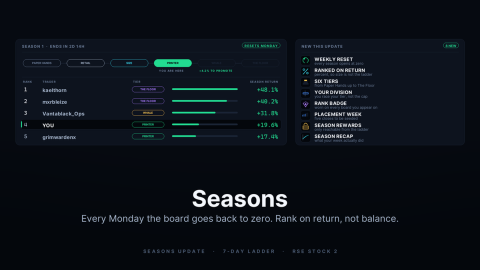
| SEASONS | "Every Monday the board goes back to zero. Rank on return, not balance." Six tiers, from Paper Hands up to The Floor |
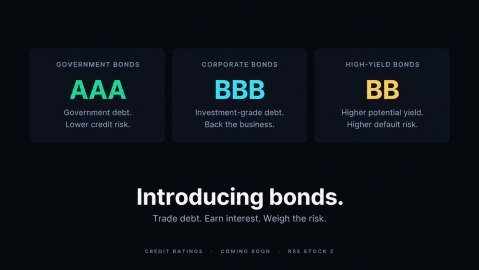
| BONDS | Three cards: Government Bonds (AAA), Corporate Bonds (BBB) and High-Yield Bonds (BB) |
| COMMODITIES EXCHANGE | Three cards: Energy (oil), Metals (gold) and Agriculture (wheat) |
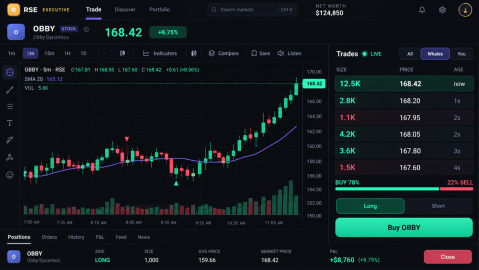
| UI Overhaul + Features | "The terminal, reimagined. Live order flow. Pro charts. Every market on one screen." |
One mismatch is worth knowing. The REAL ESTATE description says "a global map", while its art shows a United States map and says 50 states. We have not checked which one the live game matches.
How often are updates announced?
Official events have been listed with a start about once a week, usually on a Saturday. Eight of the twelve events have a Saturday start, and every Saturday from 22 August to 10 October 2026 has one. The other four started on a Monday or a Wednesday: HEDGE FUNDS, NEW FUNCTIONS, CHALLENGES and NEWS OVERHAUL, all between 17 August and 2 September.
Start hours vary. The Saturday events of 12, 19 and 26 September are listed at 20:00 UTC, the interface overhaul of 3 October at 06:00 UTC, and Custom Offices on 10 October at 20:00 UTC.
Why not use the "updated" date on the game page?
Because it does not mark updates. We read the game's Roblox record three times within 24 minutes on 8 October 2026, and its "updated" field showed a different time on each read: 03:36:09, 03:44:15 and 03:56:24 UTC. So we do not use it as a patch date; this page dates updates by event listings and store records instead.
What do the store records show?
Every pass, product and badge carries a creation date. Read together they show when the shop grew:
| Date (2026, UTC) | Created that day |
|---|---|
| 13 July | The experience itself; 8 game passes; 11 developer products, including the four algo bot products and the three time skips; 5 badges |
| 14 July | More Player Companies pass; Double Earnings and Trader Starter Pack; 5 more badges |
| 19 July | Overnight Desk pass; 10 products with pass-style names |
| 8 and 9 August | Custom Timeframes and Unlimited AI Usage passes; three AI Token packs |
| 15 August | All Gamepasses Bundle pass; Instant Acension and three products with pass names; the Met the game owners! badge |
| 2 October | Trader Pass - Season 1 |
A creation date proves the item existed by then. It does not prove it was on sale in the game that day. Prices for all of these are in the Robux shop guide, and the code that arrived with the 10K-likes milestone is on the codes page.
How do we keep this page current?
On each review we re-read the Roblox Stock Exchange 2 event listing, both store lists and the badge list. After the Custom Offices listing's end time (16 October 2026, 23:00 UTC) we will re-read all four and add whatever the store shows.
Sources
The mechanics and numbers in this guide come from the material below. Open the original pages to check them yourself.
- S001 apis.roblox.com apis.roblox.com Accessed
- S002 thumbnails.roblox.com thumbnails.roblox.com Accessed
- S003 games.roblox.com games.roblox.com Accessed
- S004 apis.roblox.com apis.roblox.com Accessed
- S005 apis.roblox.com apis.roblox.com Accessed
- S006 badges.roblox.com badges.roblox.com Accessed
- S007 create.roblox.com create.roblox.com Accessed
Related guides
How to Play Roblox Stock Exchange 2: Trades to Rebirth
How to play Roblox Stock Exchange 2, from the official description: markets, long and short trades, order types, leverage, offline market time and bots.
Roblox Stock Exchange 2 Codes (October 2026): TOOLS
Roblox Stock Exchange 2 codes for October 2026: TOOLS is the one code printed in the official game description (not tested in game). Next code at 15,000 likes.
Roblox Stock Exchange 2 Robux Shop: All 31 Products
All 31 Roblox Stock Exchange 2 developer products with Robux prices: time skips, AI Tokens, Trader Spotlight, the Season 1 Trader Pass and pass-named products.