How to Play Roblox Stock Exchange 2: Trades to Rebirth
Scope: Systems named in the official game description, badge texts, game pass descriptions and official event listings on 2026-10-08; button positions, fee rates without a pass, level thresholds and rebirth rules are not published and are not covered
Key points
- You grow a small simulated account by trading stocks, ETFs, futures and IPOs; the description also lists limit orders, stop losses, take profits, leverage and shorting.
- The Overnight Desk pass says your market keeps running for 24 hours offline "instead of 8", which implies a default of 8 hours.
- Badge totals show how many players have reached each step: first trade and first profit are common, shorting much less so, and futures, bots and rebirth are rare.
- Everything is simulated. The developer says the game does not involve real-money trading or provide financial advice.
In Roblox Stock Exchange 2 you start with a small simulated account and grow it by trading stocks, ETFs, futures and IPOs. You can go long or short, add leverage, and place limit orders, stop losses and take profits. Algorithmic bots, levels and rebirths are also listed, and your market keeps running for a while after you log off.
That summary is built from the developer's own description on Roblox. The description is a feature list, not a manual, so this guide also reads the badge texts and game pass descriptions, which give away more detail than the description does.
What does the developer say you can do?
The description opens with "BUILD YOUR TRADING EMPIRE!" and tells you to "Study price action, discover leading stocks, manage risk, and grow your portfolio, even while you’re offline!" Seven feature lines follow.
| Official line | What it tells you |
|---|---|
| Trade stocks, ETFs, futures, and IPOs | Four kinds of market are named |
| Use advanced indicators and live order flow | Charts carry indicators, and there is a view of incoming orders |
| Place limit orders, stop losses, and take profits | Three order tools beyond a plain buy or sell |
| Unlock and upgrade algorithmic trading bots | Bots are unlocked first and improved afterwards |
| Level up, rebirth, and expand your financial empire | There are levels and a rebirth system |
| Track your performance with a P&L calendar | Results are recorded day by day |
| Use leverage, short the market, and master every market cycle | You can trade with borrowed size and bet on falling prices |
The right-hand column is our plain reading of each line. It adds no numbers, because the description gives none.
What should your first session look like?
The badge totals show how many players have reached each step; they do not show the order players do things in. Roblox had awarded the Welcome badge 2,288,320 times by 8 October 2026.
- Try the code if you like. TOOLS is printed in the official description; we have not tested it in the game. The codes page has the details.
- Make one trade. The First Trade badge reads "You made your first trade!" About 90 in 100 Welcome badge holders have it.
- Close a trade in profit. First Profit ("You made your first profit trading!") sits at about 69 in 100.
- Try a short once you understand a long. First Short ("You shorted your first stock!") drops to about 27 in 100.
- Leave futures for later. First Futures Trade is under 10 in 100.
This order is our suggestion, drawn from how common each badge is. The game does not prescribe it. Exact counts for all 11 badges are in the badge list.
How do you buy, sell and close a position?
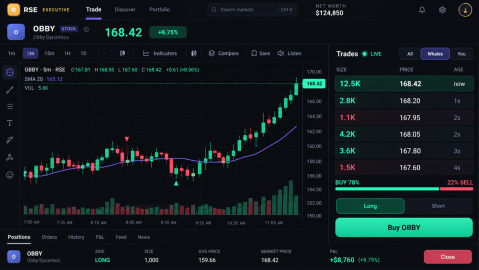
The official art above is one public look at the trading screen. It shows a Long and Short toggle above a single "Buy OBBY" button, and an open position row with a red Close button. Tabs under the chart read Positions, Orders, History, P&L, Feed and News. A second official image shows large BUY and SELL buttons beside a chart.
Treat those labels as a guide, not a map. The art is promotional, and an official event starting 3 October 2026 announced "a brand new interface for the game, reorganized interfaces, and new game features". We have not confirmed where each button sits in the live game.
What is known about leverage, fees and offline time?
The description names these systems without numbers. The game pass descriptions fill some of the gaps, because each pass says what it changes.
| System | What an official source says | Still unpublished |
|---|---|---|
| Leverage | Max Leverage pass: "Up to 50x leverage at any level." | The cap at each level without the pass |
| Fees | Pro Trader pass: "0.02% fees, unlimited drawings, pro stats." | The fee without the pass |
| Offline market | Overnight Desk pass: "Your market keeps running for 24 hours offline instead of 8." | What happens to open positions in that time |
| XP and daily rewards | VIP pass: "2x XP, 2x daily rewards, VIP badge, 1 free Sim Day per day." | XP needed per level, reward amounts |
| Market hours | A 9-Robux product is named "Skip to Market Open" | When the market opens and closes |
| Player companies | More Player Companies pass: "Launch up to 5 player-founded stocks instead of 2." | How founding a company works |
| News | Insider pass: "Early alerts before news hits + IPO intel." | How far ahead the alerts arrive |
Two things follow. The phrase "at any level" suggests the leverage you can use normally depends on your level; that is our reading, not a published rule. And the Overnight Desk description says 24 hours offline "instead of 8", which implies a default of 8 hours; no source states the base value directly. Prices and the full pass list are in the game pass guide.
What comes after the first million?
Two badges mark net worth: Millionaire ("Your total net-worth is over $1,000,000!") and $10,000,000 Net Worth. On 8 October 2026 they had been awarded 100,099 and 39,765 times. First Algo Bot stood at 50,910 and First Rebirth at 42,936.
What a rebirth costs, what it resets and what it gives are not published in any official source we can read. The same goes for the level at which bots unlock. The algo bot guide collects the little that is official about bots, including four Robux products.
Which markets were announced after launch?
The developer announces updates as Roblox events. Five of them announced whole new things to trade or own:
| Event start (2026) | Event title | Developer's words |
|---|---|---|
| 17 August | HEDGE FUNDS | "Run a hedge fund" |
| 22 August | NEW MEMECOINS | "new meme coins in the Crypto tab" |
| 5 September | REAL ESTATE | "you'll be able to buy real estate across a global map" |
| 19 September | BONDS | "Trade debt, earn interest, weigh the risk." |
| 26 September | COMMODITIES EXCHANGE | "Prices will be driven by new news events, such as weather reports and more" |
An event listing is an announcement. It does not prove the feature went live at that exact minute. The updates page has every event, including Custom Offices, listed to start on 10 October 2026.
Is Roblox Stock Exchange 2 realistic?
It uses real trading vocabulary. Limit orders, stop losses, take profits, leverage, short selling, a Level 2 order book, trailing stops and fib extensions all appear in official text. But the developer states that "All markets and currencies are simulated", the ticker in the official art is OBBY, for a company called Obby Dynamics, and Roblox rates the experience Minimal, "Suitable for everyone". It is a game about trading, and results in it say nothing about real markets.
Sources
The mechanics and numbers in this guide come from the material below. Open the original pages to check them yourself.
- S001 games.roblox.com games.roblox.com Accessed
- S002 badges.roblox.com badges.roblox.com Accessed
- S003 apis.roblox.com apis.roblox.com Accessed
- S004 apis.roblox.com apis.roblox.com Accessed
- S005 apis.roblox.com apis.roblox.com Accessed
- S006 thumbnails.roblox.com thumbnails.roblox.com Accessed
- S007 www.roblox.com www.roblox.com Accessed
- S008 groups.roblox.com groups.roblox.com Accessed
- S009 apis.roblox.com apis.roblox.com Accessed
Related guides
Roblox Stock Exchange 2 Codes (October 2026): TOOLS
Roblox Stock Exchange 2 codes for October 2026: TOOLS is the one code printed in the official game description (not tested in game). Next code at 15,000 likes.
All 11 Roblox Stock Exchange 2 Badges and How to Get Them
Every Roblox Stock Exchange 2 badge with its official unlock text, total awards and share of players, from First Trade to $10,000,000 Net Worth and Rebirth.
Roblox Stock Exchange 2 Game Passes: All 13 and Prices
All 13 Roblox Stock Exchange 2 game passes with official descriptions and Robux prices, the 999-Robux bundle maths, and four passes whose product price differs.